
Download SoundyMouse – sound effects, cursor wrapping, hidden mode, playful mouse, sci-fi sounds
Overview
SoundyMouse is a lightweight Windows utility designed to enhance the user experience by transforming routine mouse movements into an engaging auditory event. At its core, the application introduces sound effects that play in response to cursor movement, turning a typically silent interaction into a playful, immersive experience. This unique approach appeals to users seeking novelty and entertainment in everyday computing tasks. The app is particularly suited for individuals who enjoy interactive tools that add a creative or whimsical layer to their digital environment.
SoundyMouse addresses the common monotony of cursor navigation by introducing a sensory dimension—sound—that can make computing more dynamic and enjoyable. It is ideal for casual users, digital artists, gamers, and office professionals looking to inject fun into their workflow. The inclusion of cursor wrapping technology allows for seamless navigation across screen edges, eliminating the need to reposition the cursor manually. This feature enhances fluidity in multitasking and large-screen setups.
Although the developer did not provide additional technical details, the app's lightweight nature—only 2.4 MB—suggests efficient resource usage. Its release date of October 24, 2005, indicates a long-standing presence in the niche utility space. Despite its age, the app remains relevant for users who appreciate retro-inspired tools with modern functionality. SoundyMouse occupies a unique position in the productivity ecosystem by blending utility with entertainment, offering a distinctive alternative to standard mouse utilities.
Key Features & Functionality
- Sound Effects on Movement: Every cursor movement triggers a unique sound through the PC speaker. This feature turns simple navigation into a responsive, interactive experience, making each movement feel intentional and engaging.
- Cursor Wrapping Technology: The application enables the cursor to seamlessly transition from one side of the screen to the opposite side, allowing for continuous navigation without interruption.
- Hidden Mode Functionality: SoundyMouse can operate discreetly in the background, allowing users to surprise friends or colleagues with unexpected mouse sounds during shared screen sessions.
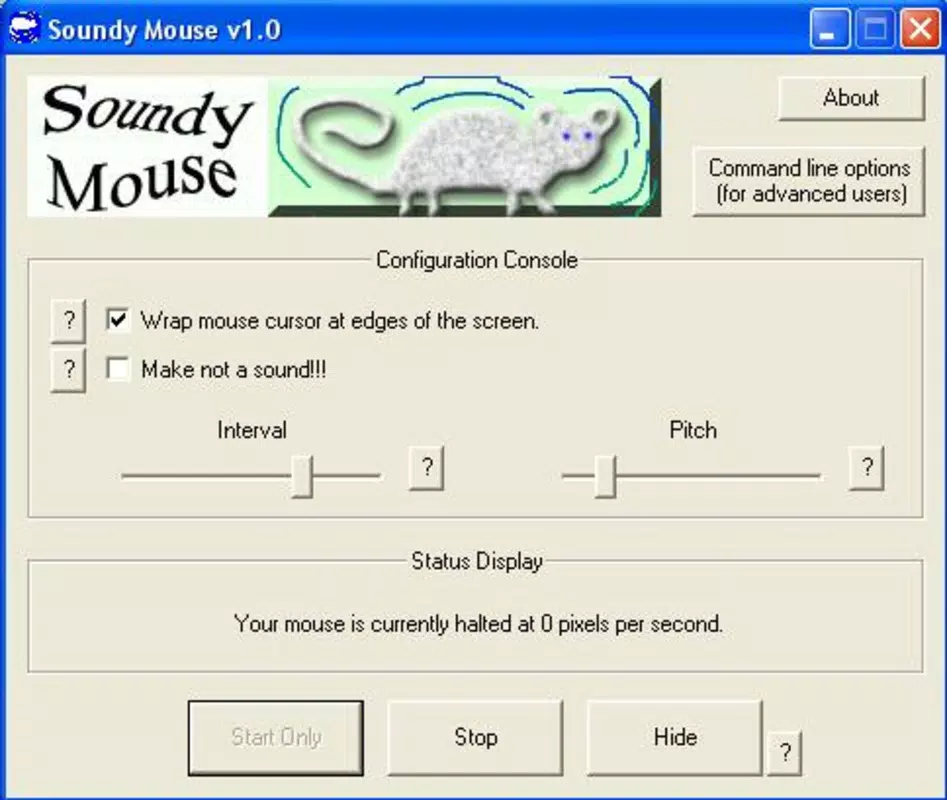
- User-Friendly Interface: The app features an intuitive interface that enables easy customization of sound preferences, wrapping behavior, and other settings without requiring technical expertise.
- Enhances Work or Play: Whether used during focused tasks or gaming sessions, the app adds a layer of fun and engagement to any computing scenario, making routine interactions more memorable.
For example, a graphic designer might use cursor wrapping to navigate large canvases without lifting the mouse, while the sound effects add a satisfying feedback loop. Similarly, a gamer could use the hidden mode to create playful distractions during multiplayer sessions. These features collectively serve users who value both efficiency and entertainment in their digital tools.
Interface, UX & Performance
SoundyMouse features a minimalist interface designed for straightforward configuration. The layout is clean and uncluttered, with clearly labeled controls for sound selection, wrapping settings, and mode toggles. Navigation is linear and intuitive, allowing users to access core functions with minimal effort. The application does not require extensive onboarding, making it accessible even to users with limited technical experience.
Although the developer did not list formal performance metrics, the app’s small file size of 2.4 MB suggests low system resource consumption. It is expected to run smoothly on older Windows systems as well as modern machines. Responsiveness is likely consistent, given the app’s focus on real-time sound triggering and cursor tracking. Stability is assumed to be reliable, considering the app’s long-standing release history.
Performance may vary slightly depending on the hardware configuration, but no specific requirements were listed. The app operates in the background with minimal impact on other processes. Users can expect consistent behavior across different screen resolutions and display setups. The overall user experience is optimized for simplicity and immediate usability.
Platform Compatibility & Technical Requirements
SoundyMouse is available exclusively for the Windows platform. It is compatible with Windows operating systems, though the specific version requirements were not disclosed by the developer. The application has a file size of 2.4 MB, indicating a lightweight footprint that should not strain system resources.
Given the app’s release date in 2005, it may function on older Windows versions such as XP or Vista, though compatibility with newer releases like Windows 11 is uncertain without official confirmation. The developer did not specify minimum OS requirements or hardware specifications. Users should exercise caution when installing on modern systems and ensure compatibility through trusted sources.
Pros and Cons
Pros
- Lightweight design with minimal system impact (2.4 MB)
- Unique sound-on-movement feature enhances user engagement
- Cursor wrapping improves navigation fluidity across screens
- Hidden mode adds a fun, social interaction layer
- Intuitive interface enables quick setup and customization
Cons
- Developer did not provide specific OS or hardware requirements
- Compatibility with modern Windows versions is not confirmed
- No official update history or support documentation available
- Sound effects are fixed; no user-upload option was mentioned
- App has not been updated since 2005, raising concerns about long-term stability
FAQ
Is SoundyMouse safe to download and install?
Yes, the app is free and available for Windows. As with any third-party software, users should download from trusted sources to ensure security.
Can I customize the sound effects in SoundyMouse?
The application includes predefined sound effects that respond to cursor movement. While the interface allows customization of settings, the ability to add personal sounds was not specified.
Does SoundyMouse work on Windows 11?
Compatibility with Windows 11 has not been officially confirmed. The app was released in 2005, and users may experience issues on newer systems.
Is SoundyMouse available for Mac or Linux?
Currently, SoundyMouse is only available for Windows. No versions for Mac or Linux were mentioned in the provided information.
How do I activate the hidden mode?
The hidden mode allows the application to run discreetly in the background. Activation steps are available through the app’s interface, though specific instructions were not detailed.
Final Thoughts + CTA
SoundyMouse stands out as a quirky yet functional utility that redefines the relationship between users and their cursor. With its sound-on-movement feature, cursor wrapping, and hidden mode, it offers a unique blend of entertainment and practicality. While its age raises questions about modern compatibility, its lightweight design and innovative features remain appealing to users seeking a playful twist on standard computing.
It is best suited for nostalgic users, pranksters, and those who value creative tools that enhance everyday interactions. For anyone looking to add a sci-fi flair to their desktop experience, SoundyMouse delivers a distinctive value proposition.
Download SoundyMouse now


